阿里天池大赛-玻璃瓶瑕疵检测

【摘 要】 本文讲述的是mmdetection环境的配置,玻璃瓶瑕疵识别的故事,虽然没有获奖,但是经验满满

一、环境介绍

1.1 安装Ubuntu

版本号是18.04,下载链接。安装过程:略

18.04的自带gcc版本可以用,不用重新安装

1.2 安装显卡驱动

选择阿里源之后,选择430显卡驱动,390太老了不建议使用(显卡10以上的电脑会报错),在安装显卡驱动之前需要在bios中把Security boot关掉。具体步骤:略。

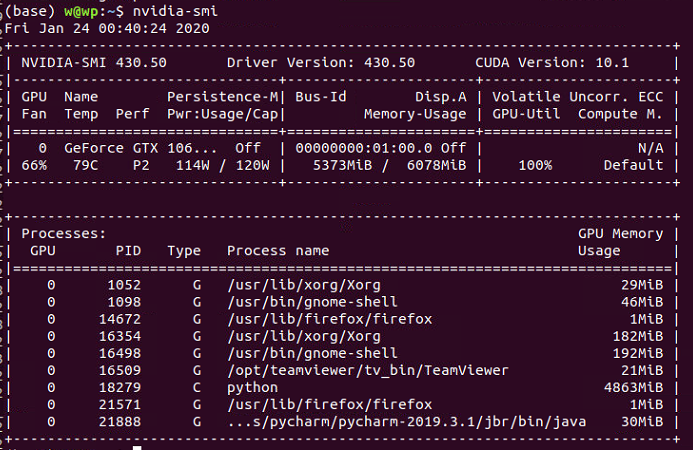
检测命令

1
nvidia-smi

1579797641093

1.3 安装cuda和cudnn

这两个是做神经网络必备的库,具体功能不清楚,在大部分教程会默认所有人拥有此库,一般没有介绍,故而报错。下载地址:

CUDA Toolkit 10.1(安装的时候,会出现一个界面,因为已经安装过显卡驱动,这里取消显卡驱动安装)

cudnn(如果进不去,说明需要注册账号,并且需要答题才能下载,选择对应版本安装就好,安装方法:双击)

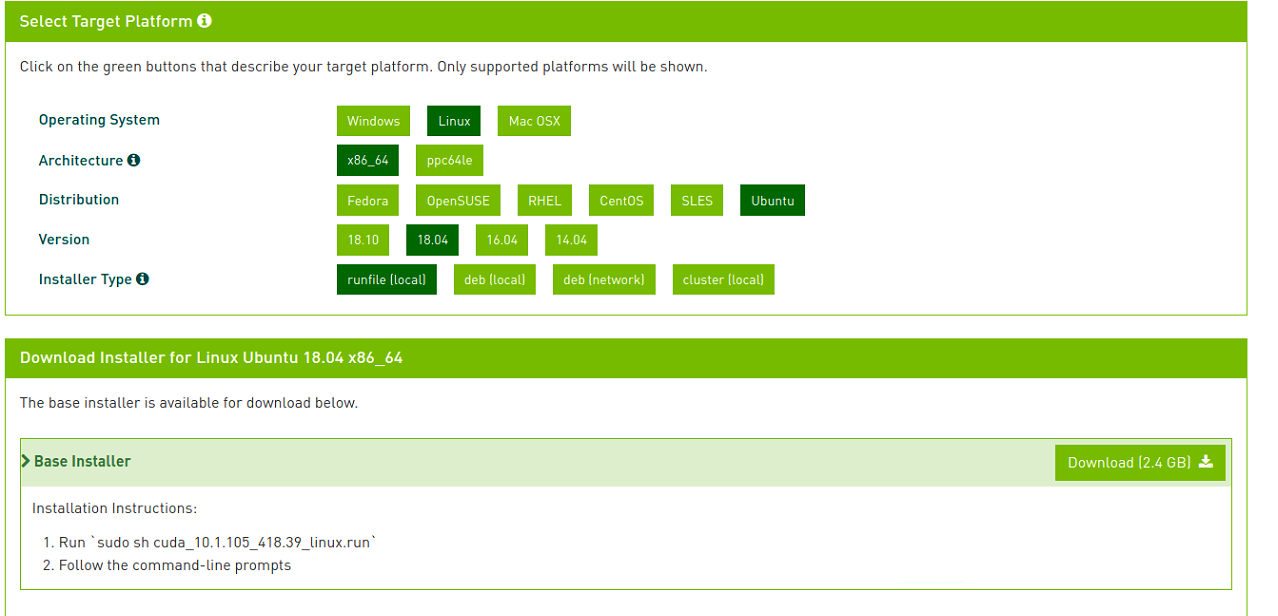
cudatoolkit 10.1的下载选项设置。
1579504960291

下载完成后,直接用上图最下面的命令安装,记得取消第一个显卡驱动的安装,不然会报错。

1.4 mmdetection安装

1.4.1 安装pytorch
1
conda install pytorch=1.1.0 torchvision=0.3.0 cudatoolkit=10.0
1.4.2 安装cython
1
pip install cython
1.4.3 clone mmdetection 库
1
git clone https://github.com/open-mmlab/mmdetection.git
1.4.4 安装必要库

进入库的根目录下

1
pip --no-cache-dir install -i https://mirrors.aliyun.com/pypi/simple -r requirements.txt

等待安装完成

-i:表示使用外部安装源,这里使用阿里云镜像,安装速度贼溜

1.4.5 安装编译
1
2
python setup.py install
python setup.py develop
1.4.6 测试
1
2
3
4
5
6
7
8
9
10
11
12
13
14
15
16
17
18
19
20
#如果安装成功,则该文件可以运行成功。
#coding=utf-8

from mmdet.apis import init_detector
from mmdet.apis import inference_detector
from mmdet.apis import show_result

# 模型配置文件
config_file = './configs/cascade_rcnn_r50_fpn_1x.py'

# 预训练模型文件
checkpoint_file = '../../checkpoints/cascade_rcnn_r50_fpn_20e_20181123-db483a09.pth'

# 通过模型配置文件与预训练文件构建模型
model = init_detector(config_file, checkpoint_file, device='cuda:0')

# 测试单张图片并进行展示
img = 'demo.jpg'
result = inference_detector(model, img)
show_result(img, result, model.CLASSES)

需要用到的权重文件下载:

链接:https://pan.baidu.com/s/1blfAtzi5TfLQ8gecYMD6PA 提取码:2dzb

这里需要自己设置一下权重文件的地址,和测试图片在mmdetection的demo文件夹下。

运行的时候可能会出现PIL加载错误,降低Pillow版本解决此问题:

1
conda install pillow=6.0.0

运行可能会报错glibc的错误,如果报错了,恭喜你,你进入了一个深坑,解决方法:

https://www.zwenc.cn/a014cc75/

二、权重文件裁减

在第一节中下载的权重文件是对应coco数据集的,总共81个分类。这次比赛只需要11个分类,所以需要对权重文件进行裁减,裁减代码如下:

1
2
3
4
5
6
7
8
9
10
11
12
13
14
15
16
17
18
19
20
21
22
23
24
25
26
27
28
29
30
31
32
33
34
35
36
37
38
39
40
41
42
43
44
45
46
47
48
49
50
51
52
53
54
def main():
# gen coco pretrained weight
import torch
import numpy as np
num_classes = 11 # 重点在这里,11个类别
model_coco = torch.load("./cascade_rcnn_r50_fpn_1x_20190501-3b6211ab.pth") # weight
model_coco["state_dict"]["bbox_head.0.fc_cls.weight"] = \
model_coco["state_dict"]["bbox_head.0.fc_cls.weight"][:num_classes, :]
model_coco["state_dict"]["bbox_head.1.fc_cls.weight"] = \
model_coco["state_dict"]["bbox_head.1.fc_cls.weight"][:num_classes, :]
model_coco["state_dict"]["bbox_head.2.fc_cls.weight"] = \
model_coco["state_dict"]["bbox_head.2.fc_cls.weight"][:num_classes, :]

model_coco["state_dict"]["bbox_head.0.fc_cls.bias"] = \
model_coco["state_dict"]["bbox_head.0.fc_cls.bias"][:num_classes]
model_coco["state_dict"]["bbox_head.1.fc_cls.bias"] = \
model_coco["state_dict"]["bbox_head.1.fc_cls.bias"][:num_classes]
model_coco["state_dict"]["bbox_head.2.fc_cls.bias"] = \
model_coco["state_dict"]["bbox_head.2.fc_cls.bias"][:num_classes]

# print(model_coco["state_dict"]["rpn_head.rpn_cls.weight"].size())
model_coco["state_dict"]["rpn_head.rpn_cls.weight"] = torch.tensor(
np.concatenate(
(model_coco["state_dict"]["rpn_head.rpn_cls.weight"],
model_coco["state_dict"]["rpn_head.rpn_cls.weight"][:2, :, :, :]), axis=0
)
)

model_coco["state_dict"]["rpn_head.rpn_reg.weight"] = torch.tensor(
np.concatenate(
(model_coco["state_dict"]["rpn_head.rpn_reg.weight"],
model_coco["state_dict"]["rpn_head.rpn_reg.weight"][:8, :, :, :]), axis=0
)
)

model_coco["state_dict"]["rpn_head.rpn_cls.bias"] = torch.tensor(
np.concatenate(
(model_coco["state_dict"]["rpn_head.rpn_cls.bias"],
model_coco["state_dict"]["rpn_head.rpn_cls.bias"][:2]), axis=0
)
)

model_coco["state_dict"]["rpn_head.rpn_reg.bias"] = torch.tensor(
np.concatenate(
(model_coco["state_dict"]["rpn_head.rpn_reg.bias"],
model_coco["state_dict"]["rpn_head.rpn_reg.bias"][:8]), axis=0
)
)
# save new model
torch.save(model_coco, "weight_%d.pth" % num_classes)


if __name__ == "__main__":
main()

需要自己设置的参数:

  • 原权重文件地址
  • 生成权重文件地址

三、数据集

训练集测试集

知识普及tips

数据集分为训练集、验证集、测试集。

训练集:用来训练神经网络的数据集,没什么说的。

验证集:在训练的过程中,每执行一次epoch,都用验证集验证一次网络训练的怎么样,验证集一般比较小。

测试集:用来做最后的输出,得分是根据测试集的结果来的,提交的是测试集输出的结果。测试集没有对应的json文件。

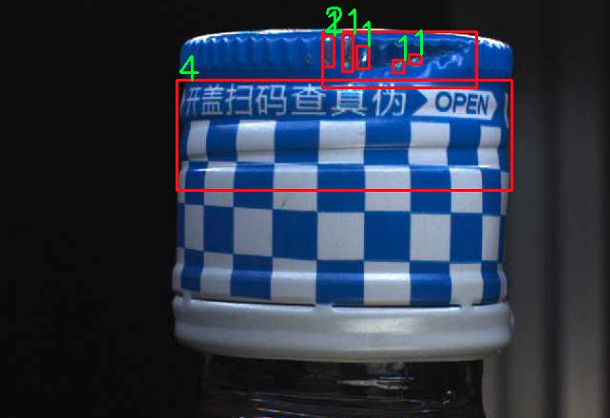
3.1 清晰数据集

官方给的数据集里面有很多只有背景的数据集,这里在训练的过程中不需要这种数据,使用代码对其清洗。我这里直接使用已经清洗好的json文件。注:只需要改变json文件,不需要动真实图片。

清洗好的json文件,点击下载

复制后,记得在文件名后面加上后缀名(.json),不然会报错。(因为我这里加上之后上传该文档就会出现各种bug,莫法)

3.2 分割数据集

由于只有训练集没有验证集,将测试集分一部分出来给验证集,分割代码如下:

分割代码-点击下载

我没有分,本身训练集就小,而且验证需要双GPU,就不分了,所以这步忽略!!!!

3.3 训练数据查看

1
2
3
4
5
6
7
8
9
10
11
12
13
14
15
16
17
18
19
20
21
22
23
24
25
26
27
28
29
30
31
32
33
34
35
36
37
38
39
40
41
42
import json
import cv2
import os
from tqdm import tqdm

data_root = "/home/w/Desktop/TC/data/"
imageRoot = data_root + "images/"
imageOutRoot = data_root + "oImageBBox/"
annFilePath = data_root + 'train/annotationsw.json'

def getBBoxById(annFile, imageId):
temp = []
for imageBBoxInfo in annFile['annotations']:
if int(imageBBoxInfo['image_id']) == int(imageId):
temp.append(imageBBoxInfo)

return temp


with open(annFilePath, 'r') as F:
annFile = json.load(F)
datalen = len(annFile['images'])
count = 0
for imageFileInfo in tqdm(annFile['images']):
count = count + 1
imageOutPath = os.path.join(imageOutRoot, imageFileInfo['file_name'])
image = cv2.imread(os.path.join(imageRoot, imageFileInfo['file_name']))

bbox = getBBoxById(annFile, imageFileInfo['id'])
if len(bbox) == 0:
continue

for bboxInfo in bbox:
coordinate = bboxInfo['bbox']
categoryId = bboxInfo['category_id']
image = cv2.rectangle(image, (int(coordinate[0]), int(coordinate[1])),
(int(coordinate[2] + coordinate[0]), int(coordinate[3] + coordinate[1])), (0, 0, 255),
2)
image = cv2.putText(image, str(int(categoryId)), (int(coordinate[0]), int(coordinate[1])),
cv2.FONT_HERSHEY_SIMPLEX, 1.2, (0, 255, 0), 2)

cv2.imwrite(imageOutPath, image)

1580480585702

四、mmdetection配置介绍(重点)

各种目标检测的配置网络都在mmdetection目标下的configs下面,只要把配置文件写好,框架会根据配置文件自动生成网络,自动训练,实际过程中只需要管配置文件就好,本小节的代码需要细看。

首先选用cascade_rcnn_r50_fpn_1x.py作为初始配置文件,查看各种资料后1,对该文件进行修改如下。

点击查看修改文件

该文件的各种参数意义,查看:

mmdetection的configs中的各项参数具体解释

如果没有配置好,我的文件可以直接复制使用,经过测试,就是最后的得分不高,绝对能跑。

其他没有细写,查看配置就好,有问题找我(前提是找到的啊

五、训练

在根目录下,运行命令行:

1
python tools/train.py configs/cascade_rcnn_r50_fpn_1x.py --gpus 1

就可以训练了。

1
python tools/train.py configs/cascade_rcnn_r50_fpn_1x.py --gpus 1 --validate

—validate表示在训练时进行评估,只有在分布式训练时能够进行评估(至少两张显卡)

训练结束后,没有双卡,如何进行测试:

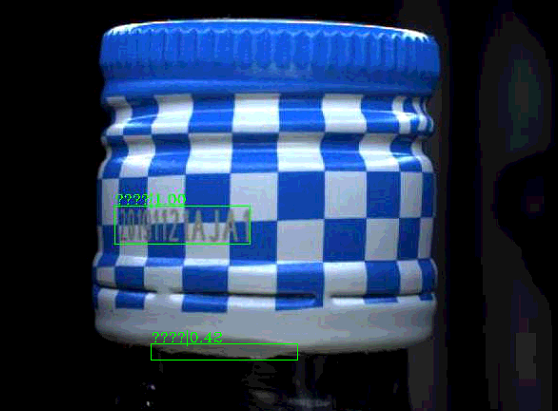
输出图片:

1
python tools/test.py configs/cascade_rcnn_r50_fpn_1x.py  work_dirs/cascade_rcnn_r50_fpn_1x/epoch_10.pth --show
1579797005296

这里因为cv2.putText()函数无法显示中文字符,故而出现乱码,实际上只需要把中文改成对应id就行,自己记住id对应的label就行。

六、提交

6.1 我的配置

提交需要用他给的代码,导入训练好的参数,和测试集的位置,生成提交文件代码如下:

1
2
3
4
5
6
7
8
9
10
11
12
13
14
15
16
17
18
19
20
21
22
23
24
25
26
27
28
29
30
31
32
33
34
35
36
37
38
39
40
41
42
43
44
45
46
47
48
49
50
51
52
53
54
55
56
57
58
59
60
61
62
63
64
65
66
67
68
69
70
71
72
73
74
75
76
77
78
79
80
81
82
83
84
85
86
87
88
89
90
91
92
93
94
95
96
97
98
# encoding:utf/8
import sys
from mmdet.apis import inference_detector, init_detector
import json
import os
import numpy as np
import argparse
from tqdm import tqdm
import cv2


class MyEncoder(json.JSONEncoder):
def default(self, obj):
if isinstance(obj, np.integer):
return int(obj)
elif isinstance(obj, np.floating):
return float(obj)
elif isinstance(obj, np.ndarray):
return obj.tolist()
else:
return super(MyEncoder, self).default(obj)

# 控制是否显示测试图片
imageShow = True

def result_from_dir():
index = {0: 1, 1: 9, 2: 5, 3: 3, 4: 4, 5: 0, 6: 2, 7: 8, 8: 6, 9: 10, 10: 7}
# indexstr = {0:"瓶盖破损",1:"喷码正常",2:"瓶盖断点",3:"瓶盖坏边",4:"瓶盖打旋",5:'背景', 6:"瓶盖变形",
# 7:"标贴气泡",8:"标贴歪斜",9:"喷码异常",10:"标贴起皱" }
# build the model from a config file and a checkpoint file
model = init_detector(config2make_json, model2make_json, device='cuda:0')
pics = os.listdir(pic_path)
meta = {}
images = []
annotations = []
num = 0
for im in tqdm(pics):
num += 1
img = os.path.join(pic_path, im)
result_ = inference_detector(model, img)
images_anno = {}
images_anno['file_name'] = im
images_anno['id'] = int(num)
images.append(images_anno)
if imageShow:
image = cv2.imread(img)
for i, boxes in enumerate(result_, 1):

if len(boxes):
defect_label = int(index[i])
for box in boxes:
anno = {}
anno['image_id'] = int(num)
anno['category_id'] = defect_label
anno['bbox'] = [round(float(i), 2) for i in box[0:4]]

anno['bbox'][2] = anno['bbox'][2] - anno['bbox'][0]
anno['bbox'][3] = anno['bbox'][3] - anno['bbox'][1]
# print(anno['bbox'])
# print(box)
anno['score'] = float(box[4])

if anno['score'] < 0.4:
continue
if imageShow:
image = cv2.rectangle(image,
(int(anno['bbox'][0]),int(anno['bbox'][1])),
# (int(anno['bbox'][2]),int(anno['bbox'][3])),
(int(box[2]), int(box[3])),
(0,0,255),1)
# print(num)
image = cv2.putText(image,str(index[i]),(int(anno['bbox'][0]),int(anno['bbox'][1])),
cv2.FONT_HERSHEY_SIMPLEX,1.2,(0,255,0),1)

annotations.append(anno)

if imageShow:
image = cv2.resize(image,(658,492))
cv2.imshow("a",image)
cv2.waitKey(1000)
meta['images'] = images
meta['annotations'] = annotations
with open(json_out_path, 'w') as fp:
json.dump(meta, fp, cls=MyEncoder, indent=4, separators=(',', ': '))


if __name__ == "__main__":
parser = argparse.ArgumentParser(description="Generate result")
parser.add_argument("-m", "--model", help="Model path", type=str, )
parser.add_argument("-c", "--config", help="Config path", type=str, )
parser.add_argument("-im", "--im_dir", help="Image path", type=str, )
parser.add_argument('-o', "--out", help="Save path", type=str, )
args = parser.parse_args()
model2make_json = args.model
config2make_json = args.config
json_out_path = args.out
pic_path = args.im_dir
result_from_dir()

使用例子,在我的工程目录中,输入以下指令:

1
python generateResult.py -m  work_dirs/cascade_rcnn_r50_fpn_1x/epoch_1.pth -c  configs/cascade_rcnn_r50_fpn_1x.py -im  /home/w/Desktop/TC/data/test/images/ -o wen1_reslut.json
  • -m:权重地址
  • -C:配置文件地址
  • -im:测试图片地址
  • -o:输出文件地址(一定要是json文件)
  • wen1_reslut.json是最后要提交的文件。

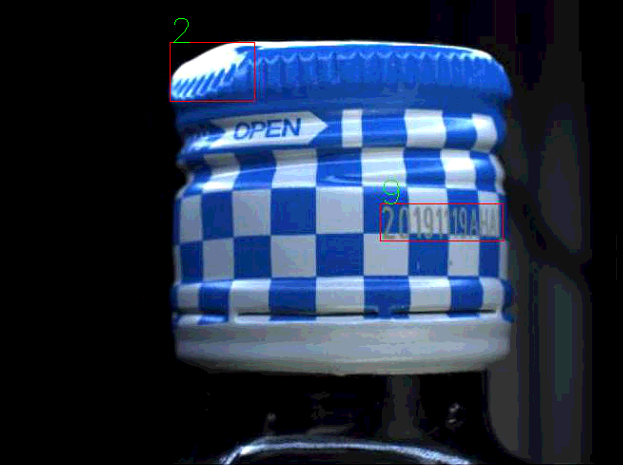
在程序中,可以通过imageShow变量来控制是否显示测试输出结果,示例结果如下:
1580218488837

6.2 注意事项

提交代码里面,有个label重映射,这是因为在训练的时候,每个样本对应的标签label和官方给的不一样。

为什么呢?

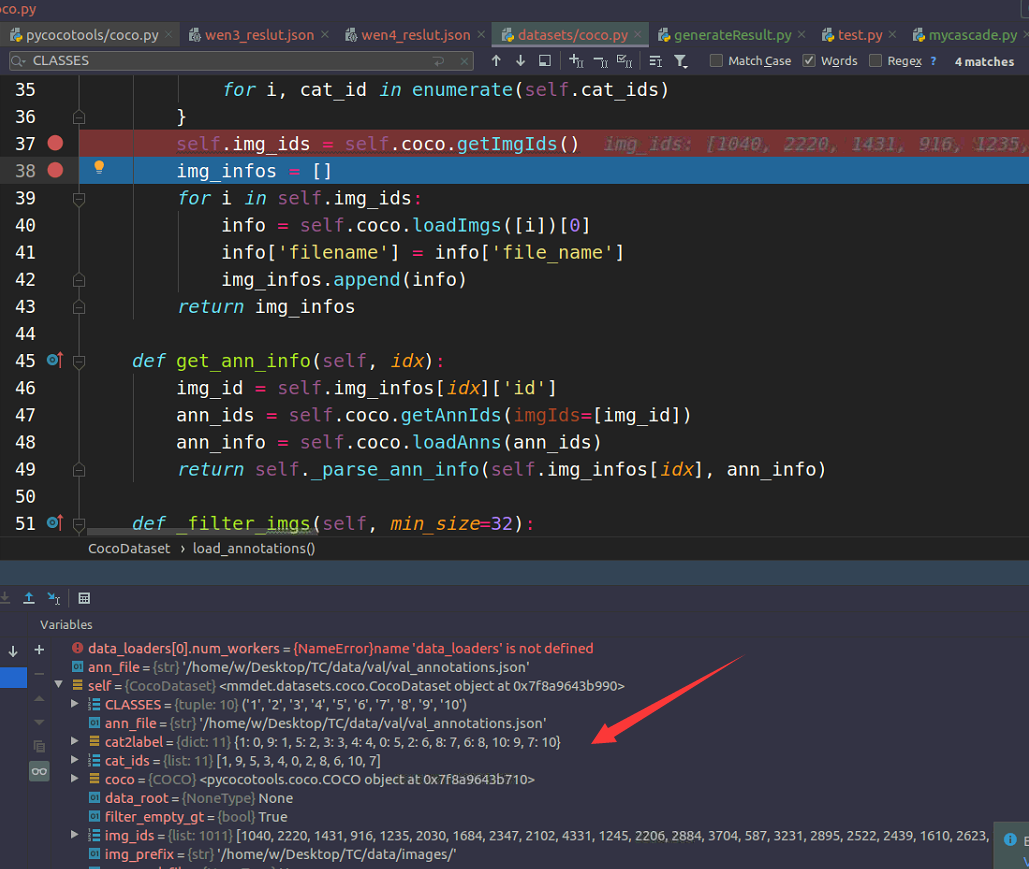
经过debug跟踪调试,程序在读取annotation.json文件的时候,对每个id进行从映射,重映射的规则是按照annotation.json文件里面的categories的循序来的,如下两图所示。每个人可能不一样,需要进行调试确认重映射是否正确。
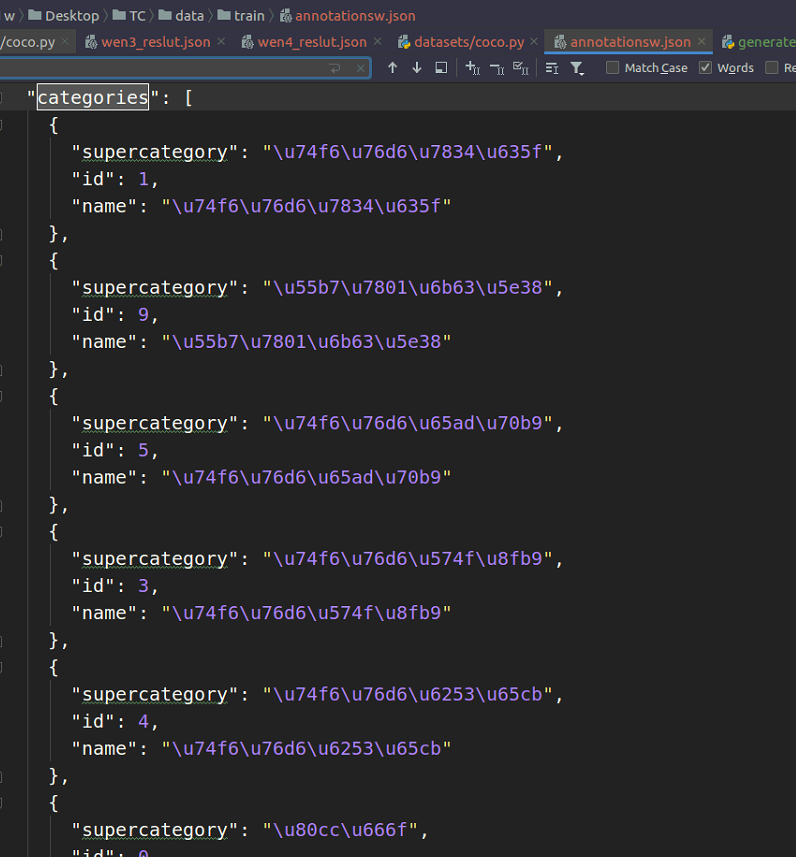
1580218151182

1580218298198

6.3 如何找到这个映射位置

Emmmm,不太好些,就乱写吧。

  • 首先确认入口函数:tools/train。
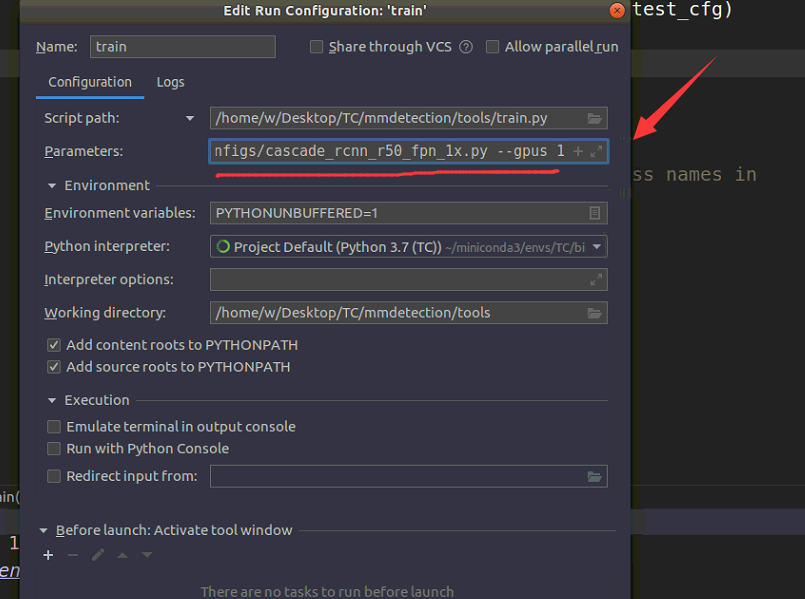
  • 设置好参数,怎么设置啊??看下面两图,这里的函数和命令行中输入的参数一致,注意地址要正确(不正确会直接报错,你肯定会发现的)
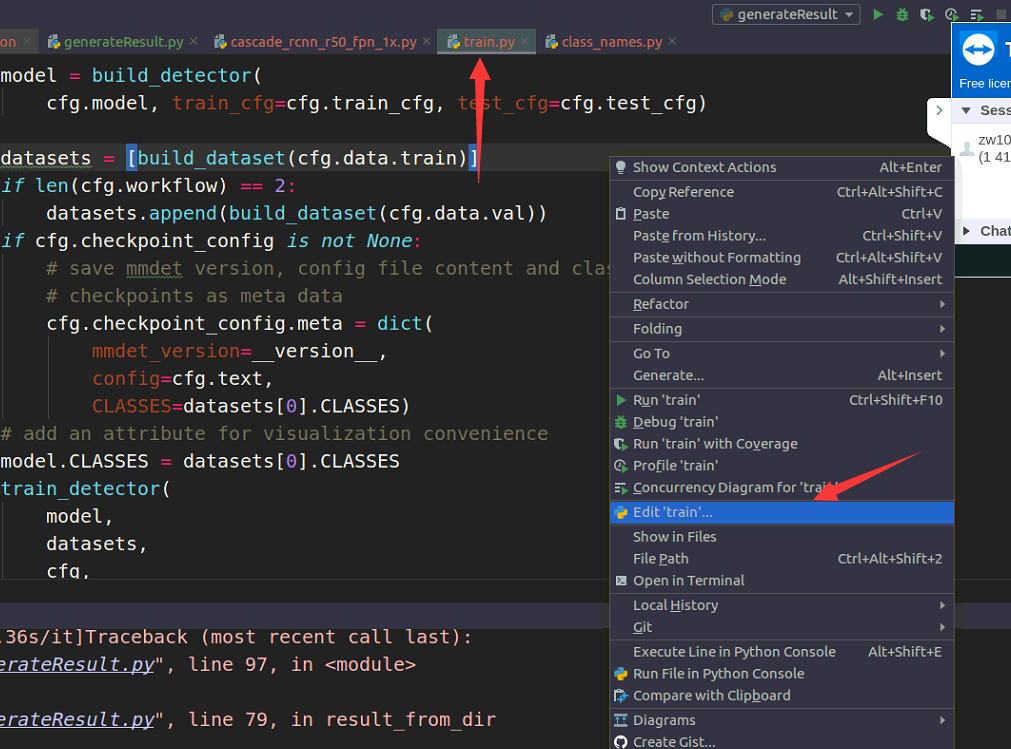
1580222413804

1580222422043

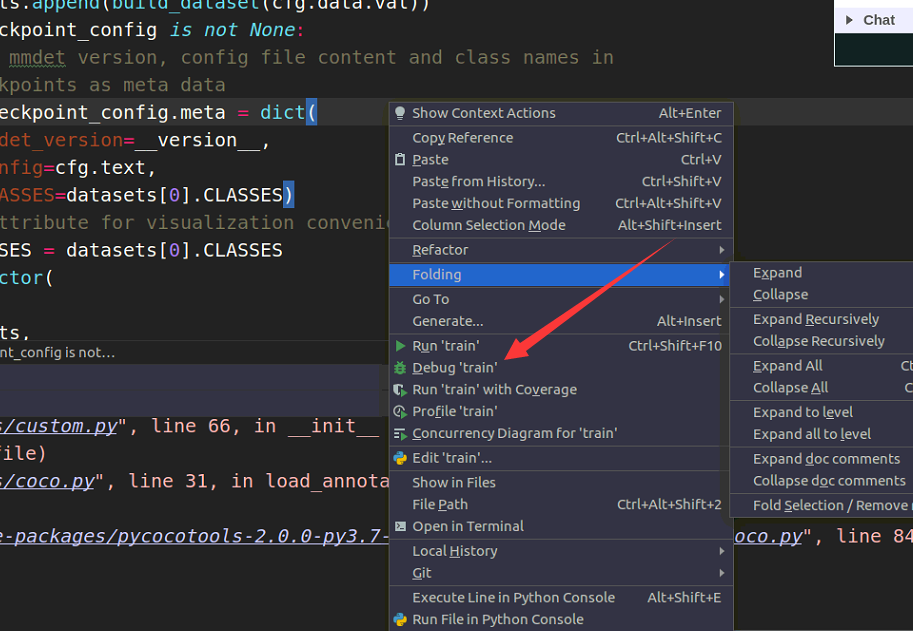
  • 然后在datasets/coco.py文件的对应位置打上断点。
  • 开始调试

1580222540466

此时就可以一步一步跟踪查看每个变量。

胡说八道结束,我也不知道我说了啥

6.4 不使用重映射的方法

在datasets/coco.py文件的_parse_ann_info函数中,将

1
gt_labels.append(self.cat2label[ann['category_id']])

修改为:

1
gt_labels.append(ann['category_id'])

即可!!

七、训练配置

(非必要部分)

为了训练中可以看到哪个训练输出的信息,哪个是验证输出的信息。分别在

/home/w/miniconda3/envs/TC/lib/python3.7/site-packages/mmcv/runner/runner.py

文件的train和val中添加打印信息:

1
2
3
self.logger.info("train process")

self.logger.info("val process")

1579797446694

不明觉厉

八、训练日志

  • 2020.1.27:cascade_faster_rcnn epoch10 0.24 500 # 无预训练权重
  • 2020.1.28:macascade_faster_rcnn epoch12 0.44 500 # 有预训练权重
  • 2020.1.28:macascade_faster_rcnn epoch6 0.39 500 # 有预训练权重
  • 20201.29: macascade_faster_rcnn epoch12 0.53 496 # 有预训练权重
  • 20201.29: macascade_faster_rcnn epoch20 0.54 492 # 有预训练权重

参考文献

1. mmdetection使用tensorboard可视化训练集与验证集指标参数
-------------本文结束感谢您的阅读-------------
0%