大理石接触分析

一、环境介绍

  • 系统:win10
  • 语言:python3.7
  • 依赖库:opencv、numpy、PyQt

二、功能说明

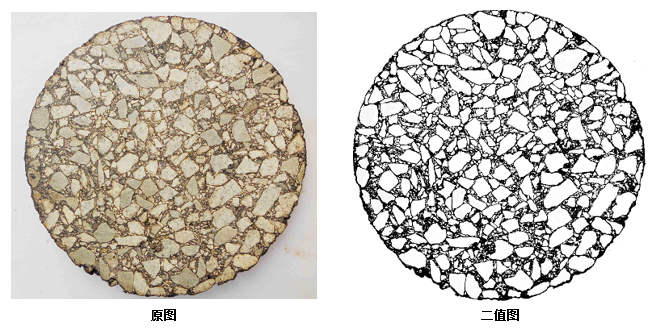
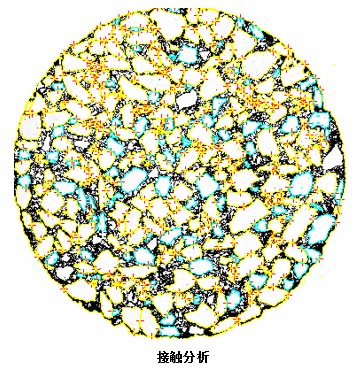
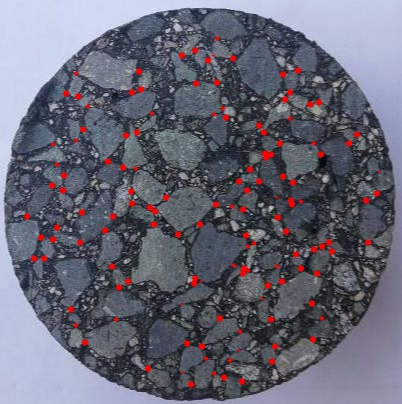
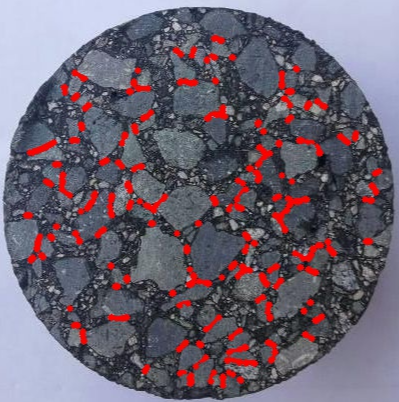
实际工程中,为了得知路面沥青质量的好坏,需要对其进行数据分析。如下三幅图所示,原图是路面沥青切片,第二幅图是原图的二值化图像(处理的这么好,当然是PS的),第三幅图画出了原图沥青石块之间的接触点。如果人工进行标注的话,工程量过于巨大,所以现在需要通过软件来实现对原图完成数据分析,需要完成以下几个功能点:

  • 二值化处理(难点)
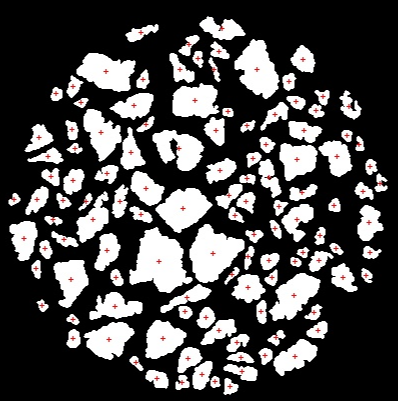
  • 石块接触分析:以二值化后的图像为基础,计算每个石块的面积,标记出石块间的接触点,计算每个石块质心位置。
  • 输出图像:
    • 大于2.36mm粗石料接触点位置(两张:点接触图像、线接触图像)
    • 接触点连接图
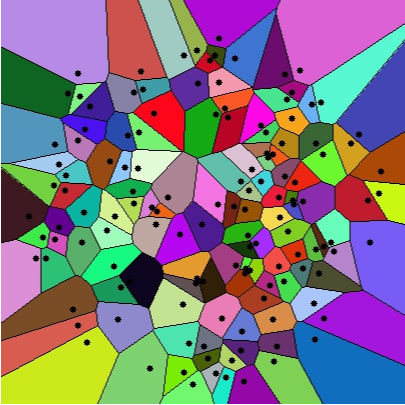
    • 接触点Voronoi图
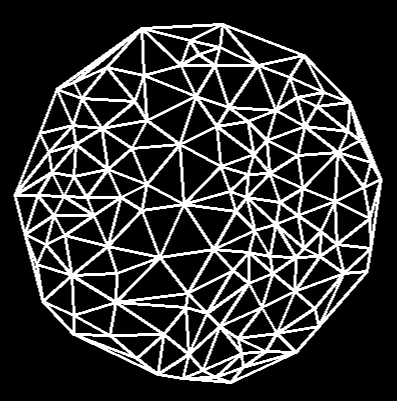
    • 大于2.36粗石料的形心连接图
  • 输出参数:
    • 相互接触大于2.36mm粗石料的面积
    • 接触点总数量
    • 平均匹配数
    • 图像总面积
    • 接触石料总面积
    • 只有一个接触点石料的总面积
    • 无接触石料的总面积(未完成)
    • 参数A:接触石料总面积/图像总面积
    • 参数B:无接触石料总面积/图像总面积

1580389512063

1580389711782

三、实现步骤

在本小节,由于Qt界面的实现太没有技术含量,省略,不介绍。

3.1 二值化

经过不停的摸索,翻遍了百度、google、论文,没有一步就可以将其二值化到上图所示的方法,什么OSTU1算法是不行的,由于它是统计整张图片的像素直方图,在光照不均匀的情况下,会产生极大的误差,阴暗位置会产生极大的误差。

(如果有足够的数据集,应该可以使用U-net来做)

为了得到合适的二值化图像,采用opencv的adaptiveThreshold自适应二值化2函数,该函数是基于小窗口二值化方法,在光照不均匀的情况下也可以得到较好的二值化结果,但是这种方法由于其本身的特性,虽然得到较好的轮廓效果,但是也会产生较大的噪声,如下图所示:
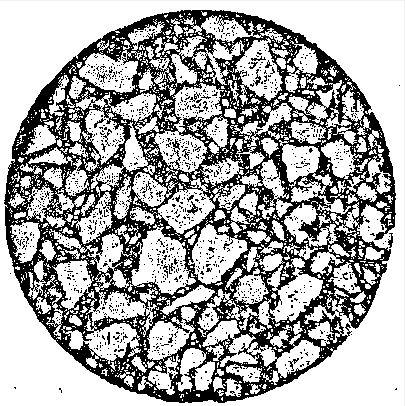
1580392929361

在上图中,虽然噪声对,但是轮廓也比较明显,接下来需要借用到opencv的findContours轮廓分析3方法,在参考文献中记录了该方法的使用方法,以及一些应用方法。首先使用该方法去除石块外的其他噪声,去除结果如下:
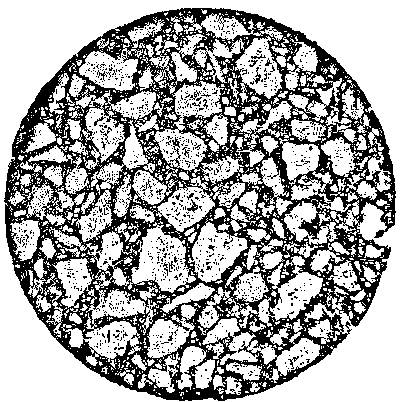
1580393248409

接下来,采用findContours给出深度3信息(用到多叉树遍历算法,不能使用递归,python的机制里面,一个函数重复调用2000多次后,会强制中断程序,需手动构建堆栈),去除掉最里面的轮廓,去除结果如下:
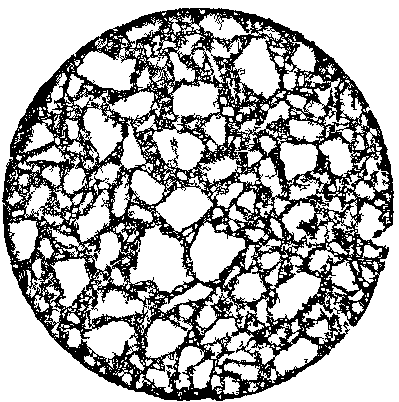
1580393316473

接下来,采用findContours给出的轮廓大小信息,去除掉小于用户指定尺寸的石块,结果如下所示:
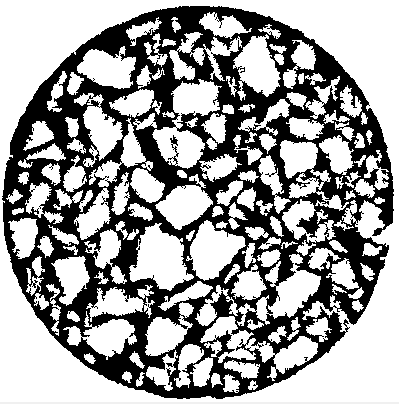
1580393391685

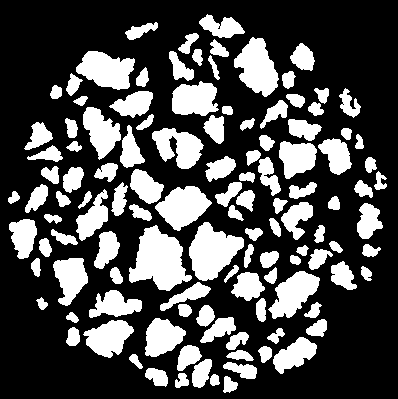
看的出来,噪声还是很大,没关系,因为这不是最后的二值化图像,还需要使用分水岭算法进行最终的处理,处理之后根据findContours方法去除小碎块和最外层边框,处理结果如下:
1580393545300

至此,石块的二值化结束(为什么和要求的不一样,因为这种二值化,更加方便后续处理),不去除最外层边框就可以和第二章功能说明里面一样!!

3.2 计算石块面积

在opencv中通过contourArea结合findContours方法可以快速得到每个块的像素点个数,成功得到每个块的面积。

1
self.blocksSize.append([contourIndex, cv2.contourArea(contrs)])
  • contourIndex:为石块的下标。
  • cv2.contourArea(contrs):该石块的面积

将每个石块的大小记录在self.blocksSize

3.3 计算接触点

点接触:两个石块之间只显示一个接触点。

线接触:两个石块之间,显示满足阈值距离的所有接触点

3.3.1 分析

这一步需要得到点接触和线接触,而点接触可以从线接触中获得,所以先获得所有的线接触。实现步骤:

  • 对每个石块的边缘进行标记,通过像素标记,如果是1,则其像素为(0,0,1)。
  • 遍历所有的块,在每个块的边缘,以圆为半径找其他块的边缘,满足则记录在数据中。
  • 点接触:在线接触中,提取出点接触
3.3.2 对石块标记

直接上代码,通俗易懂:

1
2
3
4
5
6
7
8
9
10
11
12
13
def generateMasker(self, contour):
masker = np.zeros_like(self.image)

for contourIndex, contrs in enumerate(contour):
if cv2.contourArea(contrs) < self.blocksize:
continue
# 对每一个块进行编码
x1 = int((contourIndex + 1) / (256 * 256))
x2 = int(((contourIndex + 1) - 256 * 256 * x1) / 256)
x3 = int((contourIndex + 1) - 256 * 256 * x1 - 256 * x2)
cv2.drawContours(masker, contour, contourIndex, (x1, x2, x3), thickness=1)

return masker

输入是通过findContours得到的轮廓信息,返回的masker就是编码成功的图层。

3.3.3 计算线接触

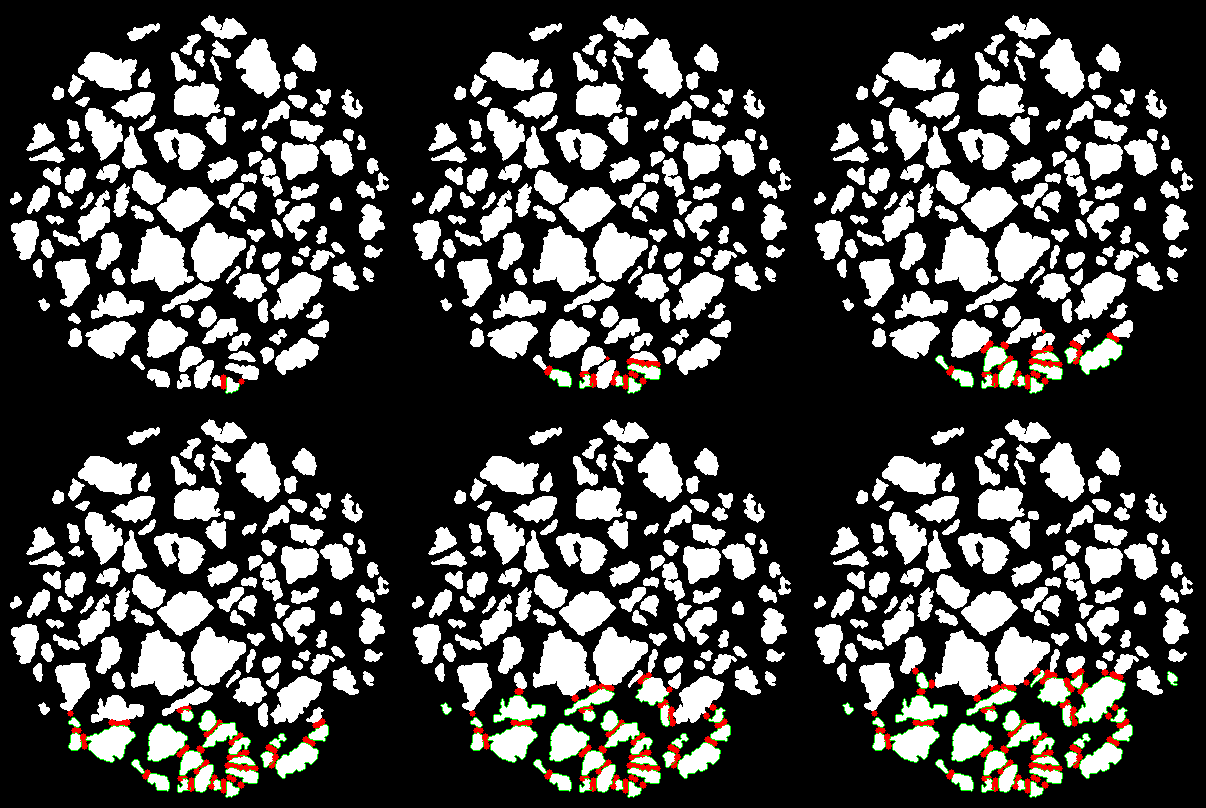
暴力法计算点附近是否有临近点,代码比较复杂,但原理比较简单,动图比较通俗易懂,直接上GIF:
ContantsGIF.gif

红色是所有满足条件的接触点,边框变绿表示该轮廓已经计算过,不再参与计算,可以看到,计算速度比较慢,毕竟是暴力法计算。

再说一下数据结构,看代码中的注释就好,将上面得到的接触点存入下面的数据结构中,后面使用起来就会美滋滋。

1
2
3
4
5
6
7
8
9
10
11
12
13
14
15
16
17
18
19
20
21
22
23
24
25
26
27
28
29
30
31
32
33
34
35
36
37
38
39
40
41
42
43
44
45
46
47
48
49
50
51
52
53
54
55
56
57
58
59
60
61
62
63
64
65
66
67
68
69
70
71
72
73
74
75
76
77
78
79
80
81
82
83
84
85
# -*- coding: utf-8 -*-
# @Time : 2020/1/22 21:04
# @Author : zwenc
# @Email : zwence@163.com

from operator import itemgetter


class contactsLinePointInfo(object):
"""
线接触点信息,记录所有满足条件的点
"""

def __init__(self):
self.PointInfo = []

def appand(self, index1, index2, point1, point2, dis):
"""
index1: 石块1
index2: 接触的石块2
point1: 接触点中心x坐标
point1: 接触点中心y坐标
dis: 半径
"""
if len(self.PointInfo) == 0:
self.PointInfo.append(TowBlocksContactsInfo(index1, index2, point1, point2, dis))
return

# 查找 index1和index2是否已经存在
for towBlocksContactsInfo in self.PointInfo:
if towBlocksContactsInfo.compareIndex(index1, index2):
# 存在,则在里面加点
towBlocksContactsInfo.append(point1, point2, dis)
return

# 不存在,则new一个两个石块接触信息
self.PointInfo.append(TowBlocksContactsInfo(index1, index2, point1, point2, dis))

def __len__(self):
return len(self.PointInfo)

def __getitem__(self, item):
return self.PointInfo[item]


# 将两个石块最小记录的最小单位
class TowBlocksContactsInfo(object):
def __init__(self, index1, index2, point1, point2, dis):
self.index1 = index1
self.index2 = index2

self.pointInfo = [point1, point2, dis]

def append(self, point1, point2, dis):
self.pointInfo.append([point1, point2, dis])

def compareIndex(self, index1, index2):
if self.index1 == index1 and self.index2 == index2:
return True

if self.index2 == index1 and self.index1 == index2:
return True

return False

def getCoordinateByMiddle(self):
# 根据坐标,将中间的点作为接触点位置返回

self.pointInfo.sort(key=itemgetter(0))

index = int(len(self.pointInfo) / 2)

return self.pointInfo[index]

def getCoordinateByMinDis(self):
# 根据距离返回接触点位置
self.pointInfo.sort(key=itemgetter(2))

return self.pointInfo[0]

def __len__(self):
return len(self.pointInfo)

def __getitem__(self, item):
return self.pointInfo[item]

3.4 计算形心位置

opencv一键操作

1
2
3
4
5
6
7
retval, labels, stats, centroids = cv2.connectedComponentsWithStats(thresh)
for index in range(centroids.shape[0]):
x, y = centroids[index]
if index == 0:
continue

self.drawCross(CentroidImage, (int(x), int(y)), (0, 0, 255), 4, 1) # 画十字叉

3.5 画形心连接图

使用cv2.Subdiv2D一键操作

1
2
3
4
5
6
7
8
9
10
11
12
13
14
15
16
17
18
19
20
21
22
23
24
25
26
im_gray = cv2.cvtColor(self.marbleinformation.blockImage, cv2.COLOR_RGB2GRAY)
_, thresh = cv2.threshold(im_gray, 128, 255, cv2.THRESH_BINARY)

retval, labels, stats, centroids = cv2.connectedComponentsWithStats(thresh)
size = self.marbleinformation.image.shape
rect = (0, 0, size[1], size[0])
subdiv = cv2.Subdiv2D(rect)

for index in range(centroids.shape[0]):
x, y = centroids[index]
if index == 0:
continue

self.drawCross(CentroidImage, (int(x), int(y)), (0, 0, 255), 4, 1) # 画十字叉
subdiv.insert((x, y))

triangleList = subdiv.getTriangleList()

for t in triangleList:
pt1 = (t[0], t[1])
pt2 = (t[2], t[3])
pt3 = (t[4], t[5])
if self.rect_contains(rect, pt1) and self.rect_contains(rect, pt2) and self.rect_contains(rect, pt3):
cv2.line(CentroidConnectImage, pt1, pt2, [255, 255, 255], thickness=2)
cv2.line(CentroidConnectImage, pt2, pt3, [255, 255, 255], thickness=2)
cv2.line(CentroidConnectImage, pt3, pt1, [255, 255, 255], thickness=2)

3.6 画接触点Voronoi图

得到接触点之后,opencv一键操作

1
2
3
4
5
6
7
8
9
10
11
12
13
14
15
16
17
18
19
20
21
img = np.zeros_like(self.marbleinformation.image)
size = self.marbleinformation.image.shape
rect = (0, 0, size[1], size[0])
subdiv = cv2.Subdiv2D(rect)
for x, y, _ in self.contactsPoints:
subdiv.insert((x, y))

(facets, centers) = subdiv.getVoronoiFacetList([])

for i in range(0, len(facets)):
ifacet_arr = []
for f in facets[i]:
ifacet_arr.append(f)

ifacet = np.array(ifacet_arr, np.int)
color = (random.randint(0, 255), random.randint(0, 255), random.randint(0, 255))

cv2.fillConvexPoly(img, ifacet, color)
ifacets = np.array([ifacet])
cv2.polylines(img, ifacets, True, (0, 0, 0), thickness=1)
cv2.circle(img, (centers[i][0], centers[i][1]), 3, (0, 0, 0), thickness=-1)

四、结果展示

形心图:

1580402839776

形心连接图:

1580402813830

点接触图:

1580402865415

线接触图:

1580402892600

接触点Voronoi图:

1580402915251

参数输出:

1
2
3
4
5
6
7
接触点数量:133
平均匹配数: 1.13
石块总面积: 1824.46 mm2
有接触石块面积: 582.67 mm2
无接触石块面积: 80.9 mm2
参数A(接触石料的总面积/石块总面积): 31.94 %
参数B(无接触石料的总面积/石块总面积): 4.43 %
1
2
3
4
5
6
7
8
9
10
11
12
13
14
15
块大小:
0: 2.177 mm2
1: 1.161 mm2
2: 1.841 mm2
3: 4.110 mm2
4: 4.629 mm2
5: 5.546 mm2
6: 1.314 mm2
7: 2.482 mm2
8: 2.207 mm2
9: 5.783 mm2
10: 12.765 mm2
11: 3.201 mm2
12: 1.726 mm2
...

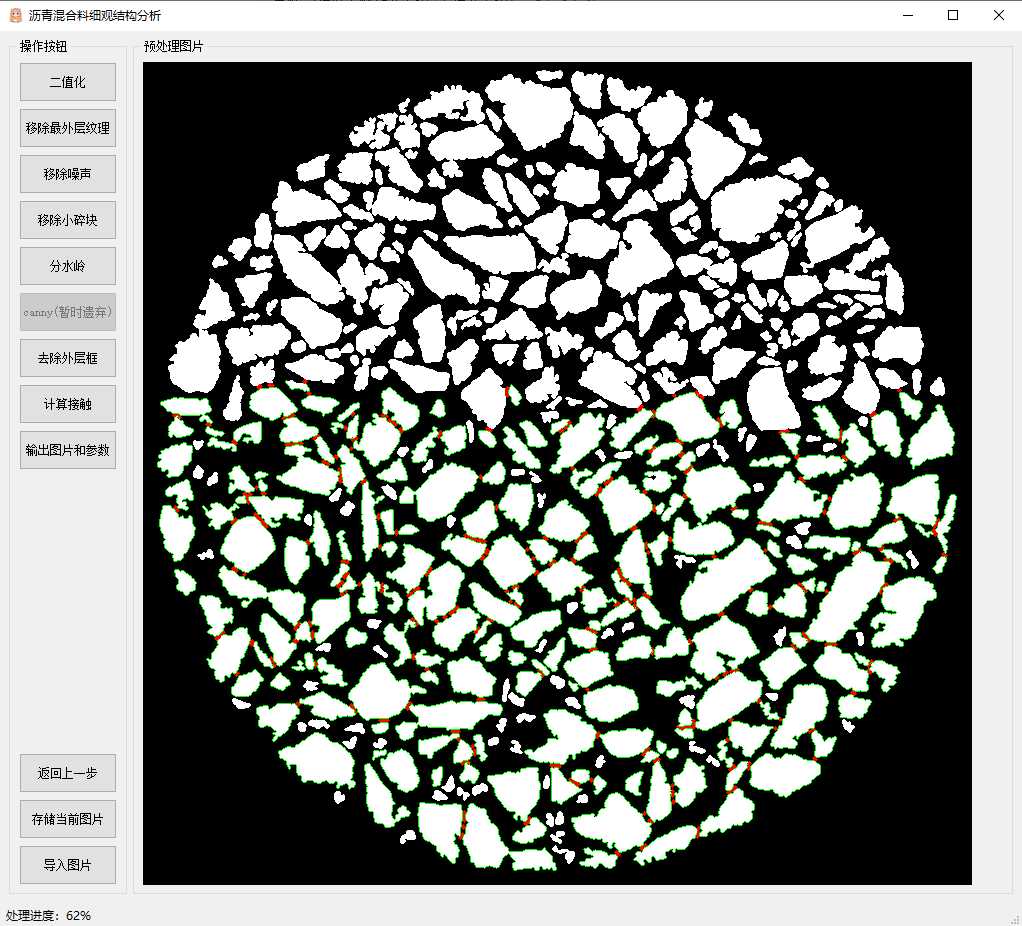
Qt操作界面展示:

1580403992075

有些点(边缘为白色的小石块)没有计算,是因为不满足设置的最小石块的大小,所以会跳过计算。

五、总结

本次项目从上手,到结束大概用了2个多月时间,一来是因为事情比较多,二来也是因为初步接触图像处理方向,不太熟悉。写完总结,本项目就告一段落了,感谢在项目中帮助我的所有人,在下收获颇丰。

高兴之余说一下不足的地方

  • Voronoi图不应该连接图片边界,而是应该连接石块边界。
  • 分水岭算法做的不好,石块大小没有完全还原,误差相对较大。

(代码暂时没有考虑上传)

参考文献

1. OSTU(大津算法)
2. adaptiveThreshold()函数
3. opencv - 轮廓查找和简单操作
-------------本文结束感谢您的阅读-------------
0%